
Skip to the demo
SupportMate Apply for a founder spotApply now
Meet Mate, your support mate

“I never got my access”
Fixed by Mate.
Not just answered.

Mate is the AI support agent that fixes the problem instead of only replying. It finds the purchase in your Stripe, checks a 6-digit code and resends your access email. Refunds and anything unsure come to you.

Limited to 10 founder spots. Mate is built and tested on practice data. The 10 founders are the first to switch it on with real buyers, with Luke beside you. Works with Stripe today. Sell somewhere else? Tell us on the form.

The same twenty messages. Every single day.

You sell something people log in to. So you get “I never got my access”, “where do I log in”, “I bought with the wrong email”. Each one is a lookup, a check, a resend. By hand that can take ten minutes, while the buyer waits hours for it.

You answer it yourself and your day is run by other people’s inboxes.
Or you pay a VA by the hour to copy and paste the same reply, in their time zone, not your buyer’s.
Or you bolt on a chatbot that says “I understand your frustration” and opens a ticket anyway.
Never got my loginJo H, your product
Where do I log in?Marcus P, your product
Paid but no email arrivedAna L, your product
Can I get a refund?Rob K, your product
Example. Three fixed by Mate, one handed to you.

Three steps. Then it is Mate’s inbox, not yours.

No developer, no migration project. On the Founder Offer we do the setup with you, on a call.

  1. Tell Mate about your product

    In your own words: what it is, how buyers get access, your refund policy, your tone. Then teach it from your old help desk tickets, or start from a pack of honest best-practice answers.

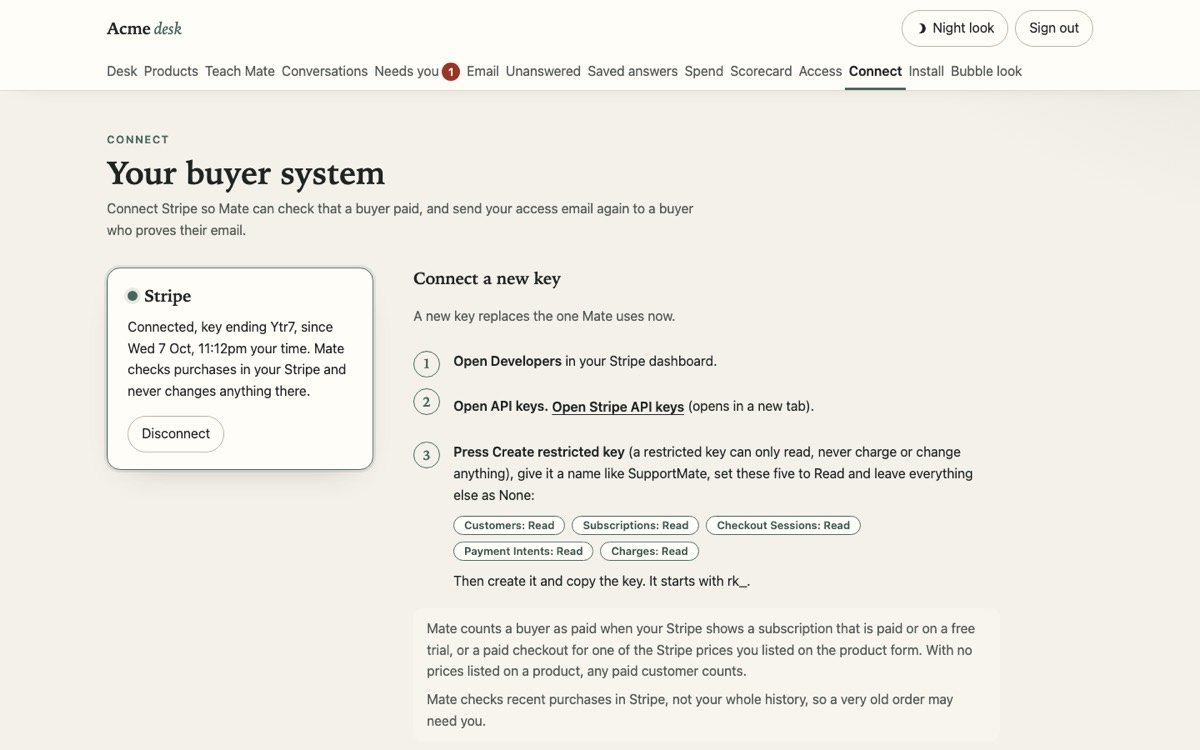
  2. Connect Stripe, read only. Paste one line.

    A read-only Stripe key lets Mate check a buyer really paid. One script line puts the chat bubble on your site. Add your support email address and buyers can write in too.

  3. Mate answers and fixes. You approve the money.

    Access problems get fixed after a 6-digit code check. Known questions get your saved answer. Refunds, cancellations and anything unsure land on your desk with one tap to Approve or Deny.

Watch Mate fix one

Pick a problem. Watch what Mate does.

Three messages your buyers send most. Tap one and watch what Mate actually does. One it fixes, one it answers in your words, one it hands to you. These are example chats, not live results.

Example on StepMate, one of our own products
The StepMate teamMate, the support agent
Example

What Mate did the receipts

    Needs you Refund request, StepMateJo Harper, bought 3 days ago. Mate checked it is Jo and attached the order. It did not decide anything.
    Example only. On your real desk, one tap runs it.

    Built and tested. The founders switch it on.

    In testing, Mate answered 40 of 40 practice questions correctly, and handled 5 of 5 trap questions honestly. It never changes an account without the 6-digit code to the purchase email: that rule is built into the code and checked by its automatic tests. Below are the real owner screens it runs on, shown with practice data. Nothing is live for buyers yet: the 10 founders are the first to switch it on, with Luke on the call.

    Apply for a founder spot $997
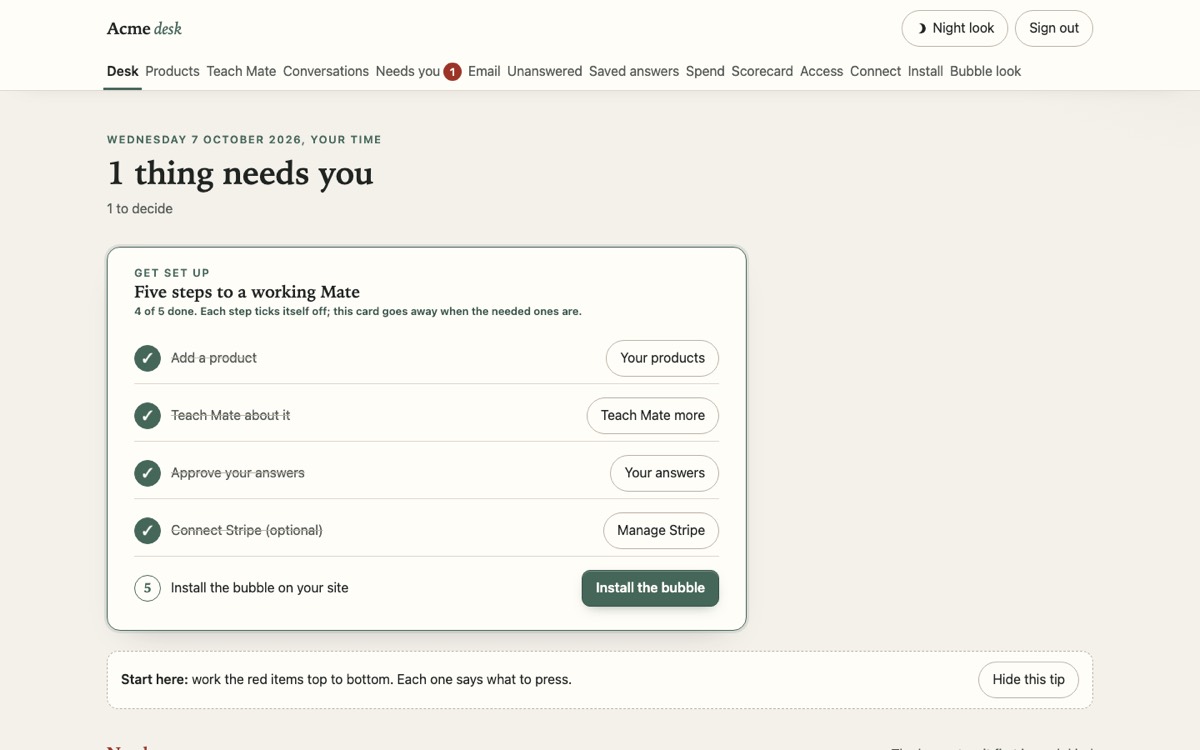
    The SupportMate owner desk showing the five setup steps, practice data
    The owner desk. Practice data.
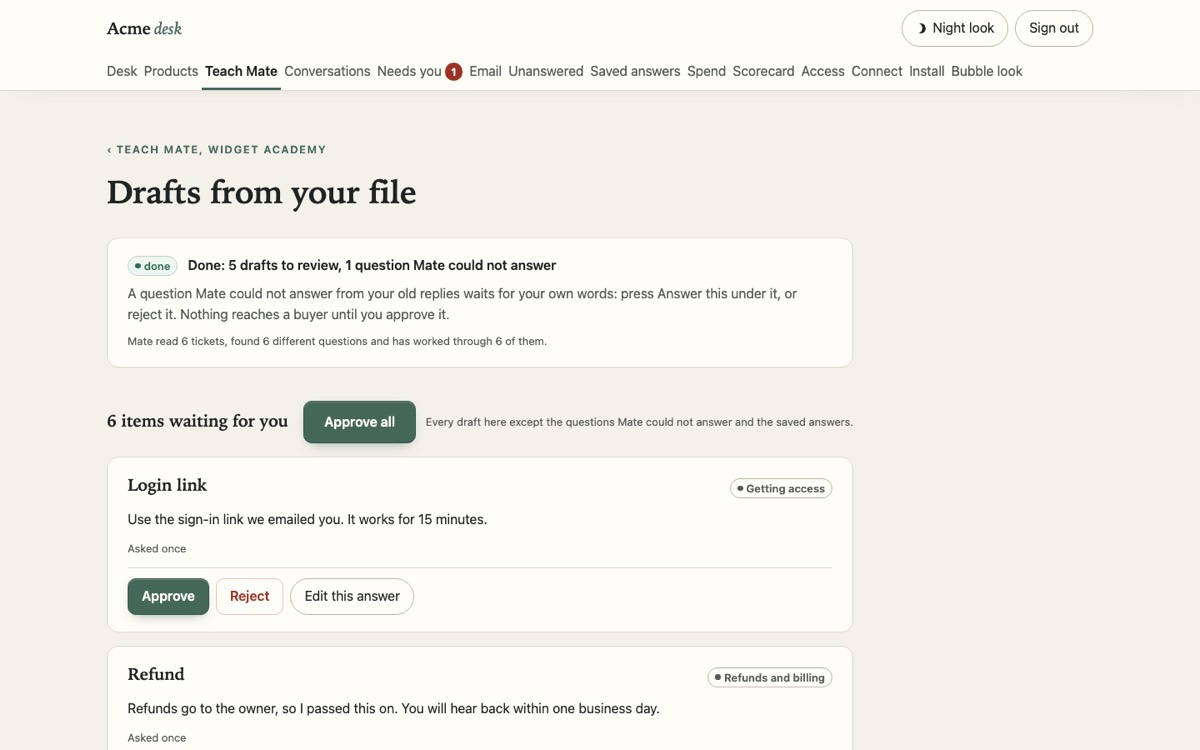
    Teach Mate drafts page with Approve, Reject and Edit buttons, practice data
    Teach Mate, drafts waiting for Approve. Practice data.
    The Connect page showing Stripe connected with a read-only key, practice data
    Stripe connected, read only. Practice data.

    Six things Mate does. And what it hands to you.

    Most chatbots talk. Mate has a short list of things it can actually do, and an honest list of what it hands to you.

    Look up

    Look up the purchase

    Finds the purchase in your Stripe, read only, from the email they bought with. No “please send your order number” loop.

    Check first

    Check who it is first

    A 6-digit code goes to the purchase email. Without the code, Mate changes nothing on anyone’s account.

    Fix

    Email changes come to you

    Bought with the wrong email? Mate checks it is them, finds the order, and puts the change on your desk with the details ready. Nothing moves until you tap.

    Answer

    Answer from what you taught it

    Your old tickets, your saved answers and your product description, in your voice. “How do I” questions get your answer, not a guess.

    Resend

    Resend the login

    The number one ticket, gone. Mate resends your own access email the moment the code checks out, and logs it on your desk.

    Hand over

    Hand refunds and bugs to you

    Money decisions, cancellations, chargebacks, bugs and anything Mate is not sure about land on your desk with the details attached.

    Money decisions come to you. Always.

    Mate never decides a refund. It checks who the buyer is, pulls the order, and puts it on your desk with one tap to Approve or Deny. The buyer hears a person is on it.

    Refunds, cancellations, chargebacks and email changes: yours, one tap.
    Bugs and anything Mate cannot answer: yours, with the details attached.
    Everything Mate did on its own: logged on the desk, so nothing happens behind your back.
    Your desk3 things need you
    • Refund request, your productJo H, verified, bought 3 days ago
      Example only. One tap runs it on the real thing.
    • Possible bug, your productA button did nothing in one browser. Steps attached.
    • Mate was not sure, your product“Can I move my plan to my business account?”

    Your old tickets become Mate’s answers, in your voice.

    Export your old help desk tickets from Freshdesk, Zendesk, Help Scout or a plain spreadsheet. Upload the file once. Mate removes the personal details first, groups the questions, and drafts an answer for each one the way you have always answered it.

    Nothing answers a buyer until you press Approve. Every draft waits for you.
    The file is read once and not kept. Your buyers’ names and emails are removed before Mate reads the questions.
    Your tickets only ever build your own Mate. Never shared, never used for anyone else’s.
    Switching from a help desk? Export the tickets you have already answered, upload them once, approve the drafts. Your old help desk can stay on while you check Mate’s answers.
    No old tickets yet? Start from a starter pack of honest best-practice answers, edit them to sound like you, approve, done.
    freshdesk-export.csv1,240 old tickets, read once
    1. Personal details removedwaiting
    2. Questions groupedwaiting
    3. Answers drafted in your voicewaiting
    4. Waiting for your Approvewaiting
    “Does it work on a Mac?” Yep, works on Mac and Windows, it runs in your browser so there is nothing to install. Log in at the link in your welcome email and you are away.
    Example only. On the real page this goes live for your buyers.
    freshdesk-export.csv deleted. Nothing kept.

    Same Mate, every place your buyers turn up.

    Pick a channel and watch the same fix happen there. Your buyers do not care where support lives. They just want it fixed.

    1 / 4
    Now showing Live chat on your websiteExample. Moves on by itself, pauses while you look.
    yourproduct.com/members
    Members area
    Module 1: Getting startedModule 2: Your first export
    I never got my access
    Sorry about that. Sent a code to the email you bought with, pop it in here.
    482913
    That is you. Login resent, check spam too.
    Fixed. No ticket opened.
    support@yourproduct.com
    Never got my loginJo Harper, 2:14amHi, I paid last night and nothing arrived. Can you help?
    Case opened
    Re: Never got my loginMate, same thread, 2:15amSorry about that, Jo. Quick check it is you: I have sent a 6-digit code to this email. Reply with it and I will resend your login straight away.
    Jo Harper, 2:16am482913
    Mate, 2:16amThat is you. Your login is on its way again. Check the spam folder if it is not there in a minute.
    Login resent. Case closed.
    app.yourproduct.com
    ProjectsSpring launch, edited today <script src="mate.js"></script>
    Where is the export button?
    Top right, under Share. Here is the help page for it.
    Answered where they were stuck.
    claude.ai
    Ask StepMate support: I bought last night and never got my login.
    SupportMate connectedSorry about that. I have sent a 6-digit code to the email you bought with. What is the code?
    482913
    SupportMate connectedThat is you. Found the order and resent your login. The same receipt lands on the owner’s desk.

    That little Mate in the corner of this page? That is what sits on your site.

    Works while you sleep

    Your 2am ticket is Mate’s 2am fix.

    A buyer on the other side of the world hits “I never got my access” while you are asleep. Mate sends the code, checks it, resends the login. You read about it over coffee.

    No “we will get back to you in 24 to 48 hours” for the problems Mate can fix itself.
    Every fix lands on your calm owner desk in the morning, with what was asked, what was done and what it cost. Spend caps sit right there too.
    Anything it is not sure about waits for you. If a spend cap is reached, new questions wait on your desk too, and the buyer is told a person is on it.
    Your desk, this morningExample
    • Resent access, after the code
    • Gave your saved answer, word for word
    • Answered “how do I export” from your help

    Write the reply once. Mate gives it word for word.

    For the questions you want answered exactly your way, you write the exact reply. When a buyer asks that question, Mate gives your words, not a rewrite, and no AI is needed to send it.

    Your words, exactly

    A known question that is not about money or access gets your saved answer, letter for letter. Close matches, and anything about money or access, still go through Mate with your saved answer as its guide.

    “Is there a Windows version?”Yes. StepMate runs in your browser on Windows and Mac, so there is nothing to install. Use the link in your welcome email.Saved answer, sent as written
    Gaps become answers

    When Mate cannot answer something, it tells the buyer a person will help and the question lands on your desk as a gap. Tap “Answer this”, write it once, and Mate knows it next time. Mate does not learn on its own. It learns what you teach it.

    Gap: “Can I move my plan to my business account?”Answered by you on Tuesday. Mate has known it since.Fewer gaps every week

    Your numbers, not ours.

    Slide to what support looks like for you today. Plain maths on your own numbers, nothing more.

    What a VA or support person costs you, per hour.
    Access problems and the how-to questions your help docs cover. Your guess, not our claim. Move it to what feels true for your product.

    This only counts the share you set. Refunds, bugs and the rest still come to you, with the work done up front.

    12hours a month of support time Mate could take over

    About 2 working days every month.

    $300a month at your hourly rate, before running costs

    That is $3,600 a year of support time at your rate. Founder price: $997.

    Your own what-if, before any costs. Mate is new, so this is not a promised result. Apply for a founder spot $997

    Your new help desk hire.
    On every hour. Never asks for a raise.

    Mate does the job your help desk staff and support VAs do all day: reads the message, finds the order, fixes the access problem, replies. It is a fixer with a short list of jobs.

    A support VA or help desk tool
    Replies to the ticket. The buyer still has to wait for the fix.
    Office hours, time zones, sick days, weekends.
    “Can you send me your order number?” Then waits again.
    Paid by the hour, or by the seat.
    Mate
    Fixes the problem, then replies. Login resent, order found, email change on your desk.
    Every hour, every day, until a spend cap hands new questions to you.
    Looks the order up itself. No order number, no back and forth.
    Founder price, $997. Set up with you, on a call.
    What Mate does not do, on purpose. Refunds, money calls, cancellations, bugs and anything it does not know go to you, with the work done up front. Mate handles the access fixes and the questions your help docs cover. It is not your whole team. It is the one who used to answer the same twenty messages all day.

    Where the locks are.

    You have been burned by tools before. So here is exactly what Mate can do, what it cannot, and where you can see it.

    Stripe is read only
    Mate reads your Stripe to see that a buyer paid. It never writes to it: no refunds, no cancels, no changes. The key is stored locked and is never shown again.
    A code before any fix
    A 6-digit code goes to the email on the purchase. Without the code, Mate resends nothing. That is the rule for the one thing it does on its own.
    Money decisions go to you
    Refunds, cancellations, chargebacks and email changes land on your desk with the order attached. You tap Approve or Deny.
    Spend caps from day one
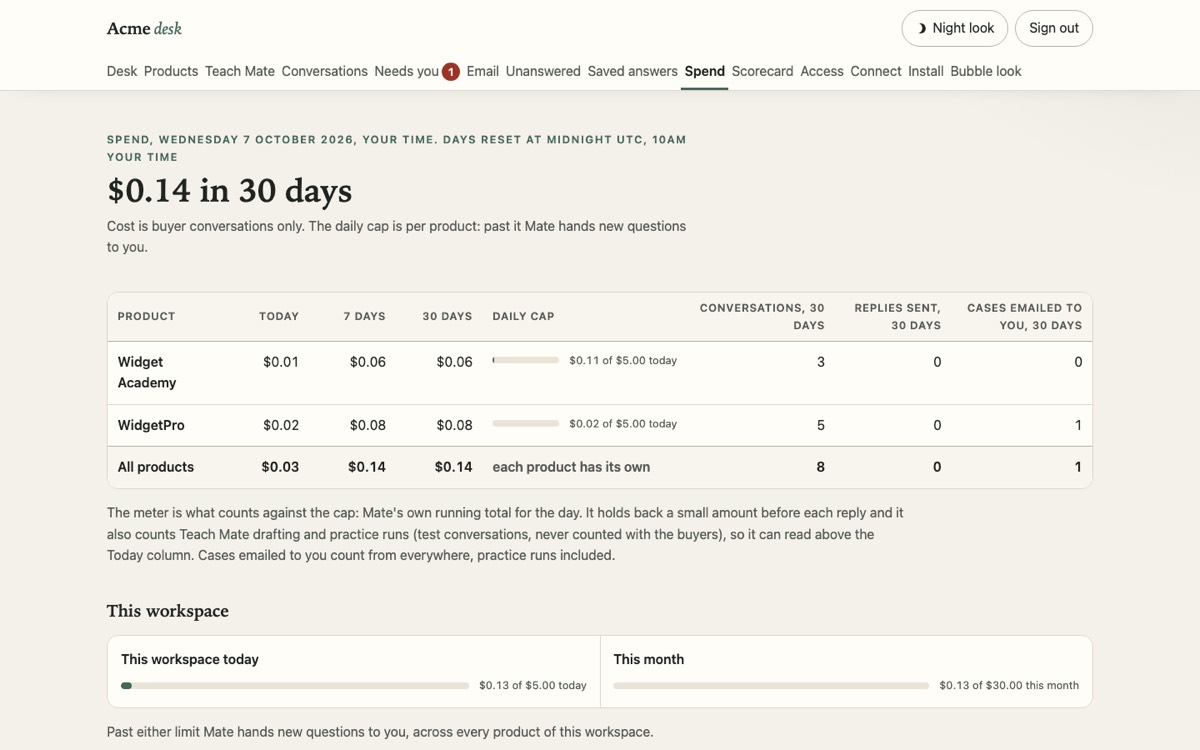
    Your AI usage is capped per day and per month, and the caps are shown on your desk. When a cap is reached, new questions wait for you.
    Uploads read once
    Personal details are removed first, the file is not kept, and nothing goes live until you approve it.
    Everything on the record
    Every answer and every fix is logged on your desk, so you can see exactly what Mate did and why.
    The Spend page of the owner desk showing the daily cap per product and the workspace caps, practice data
    The real Spend page: a daily cap per product, a daily and monthly cap for the workspace. Practice data.
    Apply for a founder spot $997 Limited to 10 founder spots. Set up with you, on a call.
    Luke Maguire, founder of SupportMate
    Built by a founder who was the help desk

    I built Mate because I was the help desk.

    I am Luke Maguire, founder of Social Media Mansion on the Gold Coast, with $14M+ in lifetime JVZoo sales across my own software. Every product I have sold gets the same “I never got my access” message at 2am, and for years the person answering it was me. Mate is built and tested on practice data. The 10 founders are the first to switch it on with real buyers, with me beside you on the setup call.

    Luke Maguire, founder of SupportMate, Gold Coast, Australia

    The Founder Offer

    Ten founders. Set up with you, not handed to you.

    By application only. We set Mate up on your product together, teach it from your tickets, and switch it on once you have approved its answers.

    $997Founder Offer
    Limited to 10 founder spots

    Mate is built and tested on practice data. You are one of the first 10 live founders, and we set your go-live date on the setup call.

    • Access problems fixed while you sleep, money decisions kept by you. Read-only Stripe check, 6-digit code, your access email resent by Mate. Refunds come to your desk with one tap.
    • Done-with-you setup on a call: your product described, your old tickets uploaded, your answers approved, the access fix switched on with you.
    • Your own private SupportMate workspace for your products, your desk, your data. Nobody else can see it.
    • Every channel: the chat bubble on your site, your support email, and an optional Claude.ai door.
    • The owner desk: Approve or Deny on money, gaps to answer, every fix logged, spend caps you can see.
    • No Claude account to set up. SupportMate runs the AI. You never set up a model or a key.
    Apply for a founder spot $997

    For scale: the big help desk tools charge about $0.75 to $2.00 per AI answer on top of $19 to $55 per staff seat a month, and a support person costs about US$21.53 an hour. See your own numbers in the calculator above. Sources: Intercom, Zendesk, Freshdesk and Help Scout pricing pages; US Bureau of Labor Statistics, May 2025. Seen 8 Oct 2026.

    Limited to 10 founder spots. When they are taken, this page will say so. No countdown, no fake counter. Stripe only for now: if you sell through something else, say so on the form and we will tell you straight.

    The questions a careful owner asks.

    Do I need Claude, ChatGPT or any AI subscription?

    No. SupportMate runs the AI behind Mate. You never set up a model, a key or an account anywhere else. The only place you will see the word Claude is the optional Claude.ai door for buyers who already live there, and you can leave that off.

    Does it touch my money?

    No. The Stripe key is read only, so Mate can see that someone paid and nothing more. Refunds, cancellations, chargebacks and email changes come to your desk with the order attached, and you tap Approve or Deny. Until you do, the buyer is told a person is looking at it.

    Is it live right now?

    Mate is built and tested on practice data: in testing it answered 40 of 40 practice questions correctly, and it never changes an account without the 6-digit code to the purchase email. It is not answering real buyers yet. The 10 founders are the first to switch it on, each on a setup call with Luke, and your go-live date is set on that call.

    How long does setup take?

    Six short steps: sign up, describe your product, upload your old tickets or pick the starter pack, approve the answers, connect Stripe read only, paste one line on your site. On the Founder Offer we do them with you on a call, so you are not left with a manual.

    What happens when Mate does not know?

    It says so, tells the buyer a person will help, and the question lands on your desk as a gap with everything it found. You answer it once and Mate knows it next time. It is set up to say so rather than guess.

    What can it actually fix on its own?

    One thing, and it is the thing that fills your inbox: finding the buyer’s purchase in your Stripe and resending your own access email after they prove it is them with a 6-digit code. Plus answers from what you taught it. Everything else goes to you. If it cannot find a purchase, for example a very old order, it says so and hands the buyer to you.

    I sell through something other than Stripe. Can I use it?

    The access fix needs Stripe today. Mate can still answer from what you taught it and hand the rest to you, but it cannot look up a purchase anywhere else yet. Tell us what you use on the form and we will be honest about whether it is a fit right now.

    What if it is not right for my business?

    Tell us on the form what you sell and how buyers get access. If Mate is not a fit, we tell you straight before any money moves.

    What does it cost to run?

    The Founder Offer is $997, limited to 10 founder spots. Your AI usage is capped per day and per month from day one, and the caps are shown on your desk. Saved answers need no AI to send. Running costs are explained on your setup call before you pay.

    Give your buyers a Mate.

    Access problems fixed in the chat. Refunds and the hard stuff on your desk, with the work done up front. That is the whole promise.

    Limited to 10 founder spots. By application, set up with you on a call.

    Apply for a founder spot.

    Step 1 of 2: apply now. We read every application and reply by email about your spot, the setup call and how to pay. Nothing is charged today.


    Limited to 10 founder spots. Applying does not charge you anything. We only use your answers to reply about your spot.

    Got it. We will email you about your founder spot, the setup call and how to pay. Check your spam folder too.